How many Node versions are you hoarding?
Cruft inventories every package manager on your Mac and hands you the exact, safe command to reclaim the space: 8 Node versions, a 6.2 GB pnpm store, a tsc untouched since 2023.
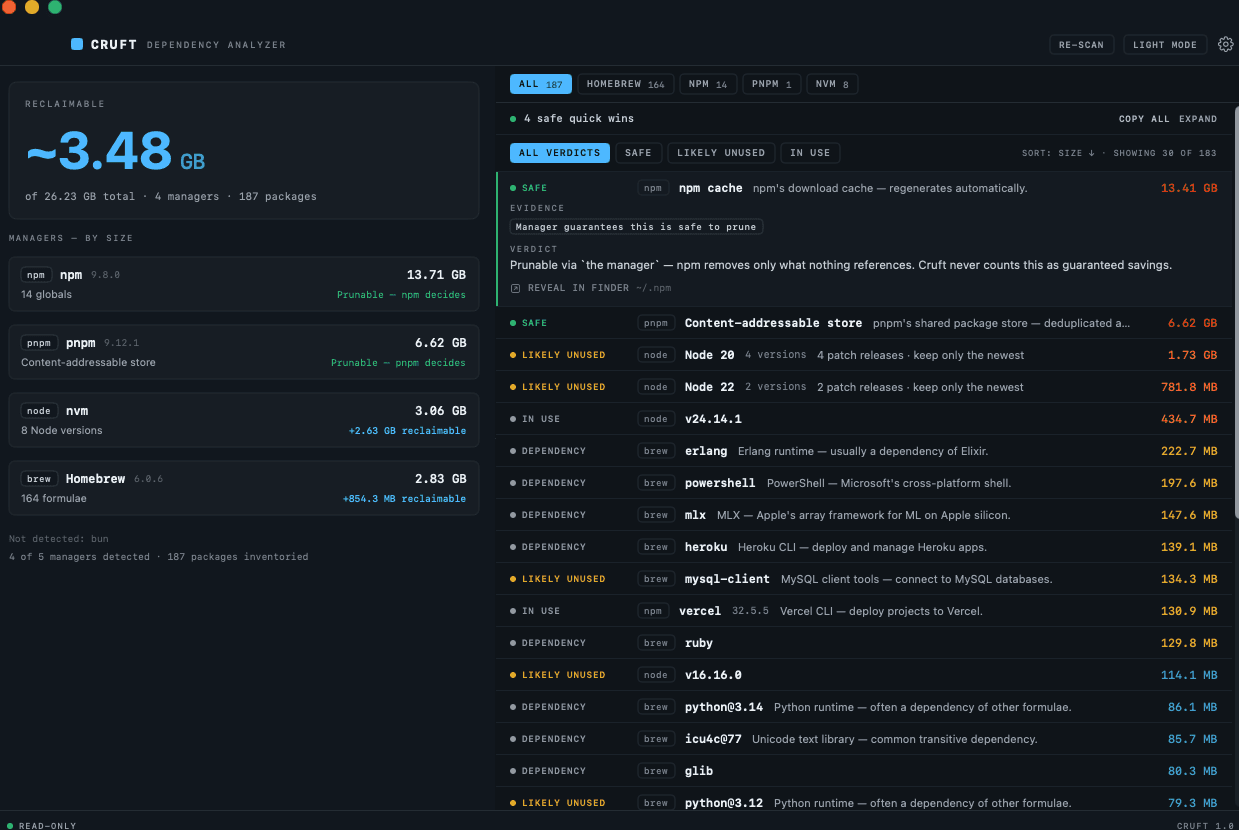
Stray dependencies filling up your storage.
Disk pressure on a dev Mac isn't one big file. It's a thousand small installs nobody notices.
Every manager piles up on its own.
brew keeps old kegs. nvm keeps every Node you ever installed. npm -g collects CLIs you tried once. pnpm's store only grows. Each one accumulates alone.
Nobody audits five CLIs.
Five list commands, five cache paths, five different cleanup flags. You would have to remember all of them, so nobody runs any of them.
Cleaning up by hand is risky.
One wrong rm -rf inside ~/.nvm and your default Node is gone. So the safe move is to leave it, and it keeps growing.
Evidence over blind cleanup.
“Cleaner” apps guess what's safe and hope. Cruft puts every finding in one of three honesty tiers, and never claims more than the evidence supports.
Every dependency Cruft finds gets one of three verdicts. The colored tag on each item tells you exactly how much Cruft is willing to claim about it:
Safe by design
The manager's own cleanup commands, like brew cleanup and pnpm store prune. Worst case, the next install re-downloads a tarball. These are the quick wins.
Orphan candidates, with evidence
Real structural signals: nothing depends on it, it isn't your active version, it hasn't been touched in months. Cruft shows the evidence. You make the call.
No verdict when there's no proof
Installed, size, last used, and nothing more. When the evidence doesn't support a verdict, Cruft doesn't invent one. Restraint is the feature.
Here is what a single item looks like in the app: the verdict, the evidence behind it, and the exact command to act on it.
Probably unused, your call. If you don't use Erlang directly:
brew uninstall erlangNo subscription. $4, once.
A CleanMyMac subscription runs about $40, every year. Cruft is $4 one time, for the part that actually takes judgment: the verdicts and the curated safety knowledge behind them. The inventory? Free forever, scan as often as you like.
The full inventory. Forever free. The scan is never gated.
- All 5 package managers inventoried
- Sizes and totals for everything
- One unlocked verdict
Honestly scoped: every v1 update is included. If a 2.0 ever ships, it's a separate paid upgrade, and v1 keeps working either way.
- Everything in Free
- All verdicts with evidence
- All reclaim commands
- Reclaimable summary + per-manager rollups
- Feature requests: submit & upvote
- Up to 3 Macs
- Lifetime v1 updates
MACOS 14+ (SONOMA) · APPLE SILICON + INTEL · NO FULL DISK ACCESS REQUIRED
The questions devs actually ask.
Does Cruft delete or uninstall anything?
Never. Cruft is an analyzer, not a cleaner: it inventories, explains, and hands you the exact command. You copy it, read it, and run it in your own terminal, or don't.
Can it break my setup?
The scan can't: Cruft runs zero mutating commands, only each manager's own read-only list and query calls through allowlisted adapters. And the verdicts it shows are evidence-tiered (safe-by-design / likely unused / signal only), never guessed.
Which package managers does it cover?
Homebrew (formulae and casks), npm globals, pnpm, nvm, and bun in v1. More managers land via the in-app Feature Requests tab, where licensed users submit and upvote.
Will it work on my Mac?
macOS 14 (Sonoma) or newer, on both Apple silicon and Intel. No Full Disk Access, no permission flow. The first scan runs in seconds.
Lost your license?
Open the Lemon Squeezy customer portal and your key plus download link are re-sent to your purchase email. Licenses cover up to 3 Macs.